Securing AWS Step Functions

AWS Step Function is a serverless orchestration service that allows you to integrate with various services like AWS Lambda functions to build event-driven workflows using state machines and tasks.


In AWS Step Functions, a task represents a state(each step) in a workflow(state machine) that corresponds to a unit of work performed by another AWS service.

A State Machine/WorkFlow can be defined as:

  • Describes a collection of computational steps split into discrete states.
  • Has one starting state and always one active state (while executing).
  • The active state receives input, takes some action, and generates output.
  • Transitions between states are based on state outputs and rules that we define.

Workflows can run concurrently in parallel or be designed to wait for the completion of other workflows.

Types of Step Functions:

Standard vs Express Workflows   [AWS Docs](https://docs.aws.amazon.com/step-functions/latest/dg/concepts-standard-vs-express.html)

Basic Step Function

You can define a State Machine, which is a collection of states, using the Amazon States Language, a structured, JSON-based language used to specify various state types such as Task states for performing work, Choice states for determining state transitions, and Fail states for stopping an execution with an error.

You can refer — https://docs.aws.amazon.com/step-functions/latest/dg/concepts-amazon-states-language.html for more information

Example State Machine using Amazon State Language --- [Source](https://docs.aws.amazon.com/step-functions/latest/dg/amazon-states-language-state-machine-structure.html)

Types of Invoking a Step Function:

  1. Run a job: This type of invocation involves invoking a Step Function to run a job and waiting for the request to complete. Once the request is completed, the next step in the workflow, such as joining data, can be executed. 
  2. Request-Response*: In this approach, a client sends a request to a Step Function, which coordinates the execution of the request and returns a response to the client. For example, a Step Function can be integrated with AWS Simple Notification Service (SNS) in the express mode, where the function waits for the response from SNS before proceeding to the next step in the workflow.
  3. Await Callback: This type of invocation involves waiting for a callback, which can be either a success or a failure callback. In this approach, the Step Function invokes a service and waits for the response before proceeding to the next step in the workflow.
  4. Saga Orchestration Pattern: This pattern manages long-running transactions across multiple services.

*Express Workflows only support the Request-Response method of invocation.


Securing a Step Function

Securing a Step Function can be divided into the following categories:
Read more

Demystifying JA3: One Handshake at a Time

Recently, I was browsing a website with BurpSuite and found out that the website was blocking my requests. In the pursuit of unlocking the mystery of how I have stumbled across an incredible TLS fingerprinting technique called JA3.


Backdrop

Fingerprinting clients and blocking them based on a particular set of rules is not new. Many companies do have intelligent ways of Fingerprinting clients(one reason being to detect bots and malicious traffic) by using a cookie to track a user uniquely. After Snowden’s leak back in 2013, many websites started to adopt the HTTPS version by default. Many applications like malware, IoT devices also use TLS to connect securely to the Server. Thus, the popularity and widespread of the TLS protocol led to research and discovery of newer ways to fingerprint users uniquely.

How do HTTPS Connections work?

HTTPS in short is combination of two things:

  • TCP(Transmission Control Protocol) —  3 Way Handshake
  • TLS (Transport Layer Security)Client — Server Negotiation

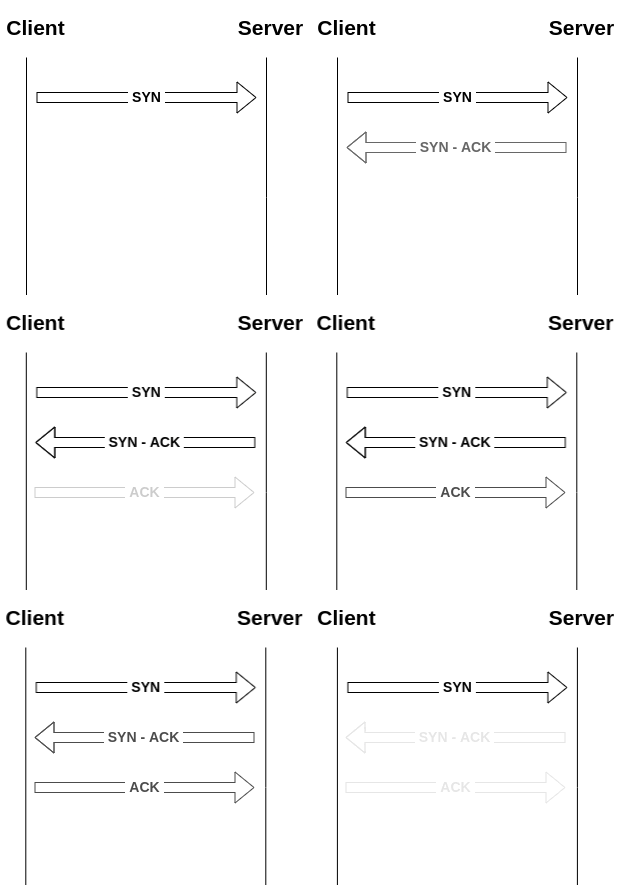
TCP Handshake, also known as a 3 Way handshake, is a process in which the Client and Server establish a TCP Session. The following diagram illustrates how a TCP Connection is established.

TCP 3 - Way Hand Shake
Read more

Securing Android The Hard Way

Recently Google has announced Android 12 , reltively less people use the newer version of Android. On a side note, Android is popularly used as compared to it’s competetions iOS which makes it juicy target for hackers.

You might ask this question why harden when default settings does the job.
Well, most of the defaults are not the best. So in this blog, I will document my
hardening journey aka “Securing” my Android phone running Android version 9.0 and some intresting findings.

Bloatware

Bloatware are those apps which come installed by Default on Android Devices.These are usually Dangerous apps(not necessarly) and may collect User’s Data in the Background. You can read more about Bloatware here

They can be removed by Enabling ADB Brdige on your Device and then run the following command
pm uninstall –k ––user 0 <name of package>

which essentially uninstalls the package for the user 0(which is you).
For more detailted steps checkout this arctile
From my knowledge, MIUI or any other customized vendor specific Android ROM’s have most number of Bloatware’s installed as compared to AOSP.
You can also look at Universal Android Debloater GUI tool to debloat your device via GUI.

App’s running in Background

Many apps tend to run in the backgroud even if you remove them from your recent applications window.(Well that’s how you get Notifications :P)

This is annoying due to following reasons:

  • If a application is running in Background it consumes Battery, RAM andd Mobile Data tp sync making the device slow(when RAM <= 4GB)
  • As we give all the Sensor permissions(Camera/Microphone) to these apps for their functionaliy, they can stalk you in the Background(since they aren’t closed) and this can be used for Targetted Advertising which is the worst part.
  • When you are using VPN on your Android device, Google Apps sync in the Background(asscoiating your VPN IP with your Google Account)

We can stop apps running in background using a App called Greenify and it works on non-rooted phones as well. In the latest verion of Android we can enable Battery saver mode and that does the job, but an added advantage of Greenify is that you can Force stop aka “Hibernate” system apps like Google Chrome, Playstore which gives you more control on your phone.Setting up Greenify is pretty easy and you can lookup on the Internet.
There are other alternatives you can checkout which are Brevent , Doze, Naptime.

My Observation’s

  • If you Greenify system apps, they get started in the background when they are required.
    For example, if you force stop Phone app and whenever you get a call, it starts in the background.
  • Sometimes, some apps get invoked by some actions or invoke other apps in return
    For example, Zomato app starts running in the Background whenever you get a Call on your phone and when you normally open Zomato App, it opens Google Pay App in the Background.

By essentially force stopping these apps in the background, you can prevent these apps from snooping your microphone in the background.

Network

Whenever a malicous app is installed, it conects back to it’s C&C Server via network and having restrcitins at network level plays a vital role. Unlike Desktop Computer’s, Android gives us very less control on the Network flowing in and out of Device. We can take advantage of VPN Service in Android to monitor our traffic.

To harden our Netwrok Traffic, we can use a App called No Root Firewall.

Hello GSoC

I’m super excited because I’ve been selected to work with Libreswan for GSoC 2020.

Wait, what’s GSoC?

Google Summer of Code, also referred to as GSoC, is a three-month-long Google administered program that connects students with Open Source organizations to solve real-time problems. Open Source org receives quality contributions while students get hands-on experience.

Ok, Why should I contribute to Open Source?

If you think that Windows is sluggish and vulnerable then I bet you haven’t tried Linux(which is of course Open Source) yet. Open Source projects are simply the best. You can learn how to understand other’s code(usually difficult) and communicate, collaborate with people all around the world. You can check out this article for deeper insights.

Read more
Your browser is out-of-date!

Update your browser to view this website correctly.&npsb;Update my browser now

×